Six AI tools.
One skill library.
No silent overwrites.

Local-first two-way sync for agent skills, MCP servers and rules — across Claude Code, Codex, Gemini CLI, Cursor, VS Code Copilot and DSH.

SHA-256 state tracking, per-target backups, and conflicts that exit non-zero instead of quietly clobbering your work. Zero runtime dependencies.

$npx skills add Jack91124/ai-extension-manager
$pip install git+https://github.com/Jack91124/ai-extension-manager
CI skills.sh installs release MIT zero dependencies
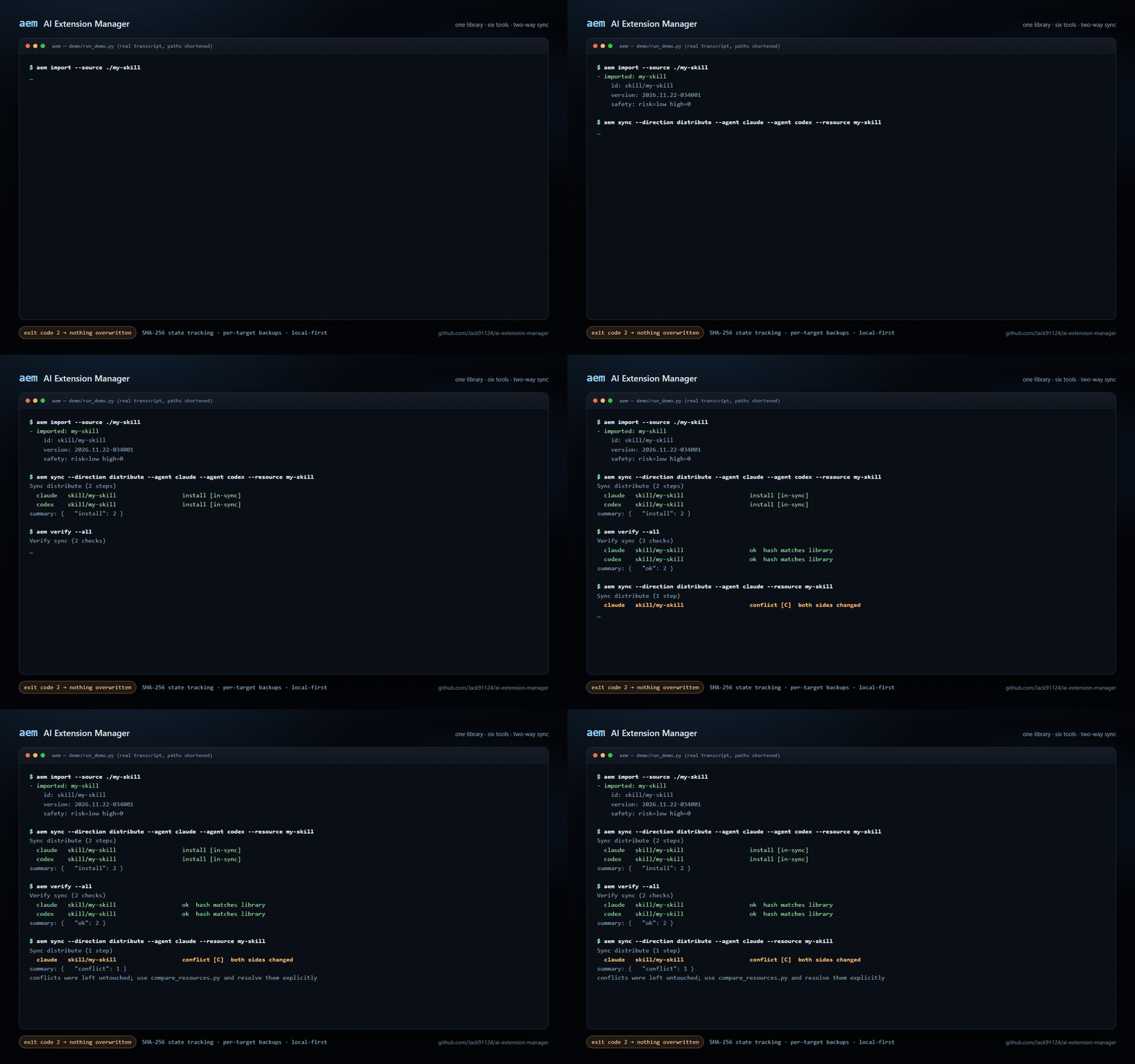
aem import, distribute, verify and conflict transcript

What it actually solves

Skills you write in one tool stay trapped there, and the sync scripts people write instead overwrite whatever changed last.

📚

One library, content-addressed

Every resource lives once under ~/.ai-extension-manager/library with a manifest, SHA-256 tree hash and version history. Agents consume copies or links from it.

🔁

Two-way, state-aware

Import scans any agent; distribute pushes to one, many, or every compatible agent. Each target records source_hash + target_hash so the next sync knows who changed what.

🛡️

Refuses to clobber

Both sides changed → conflict, exit code 2, nothing written. You resolve explicitly with --on-conflict, after automatic per-target backups.

Conflict handling you can reason about

mtime is not a merge strategy. aem compares library hash, last-synced hash and current target hash.

$ aem sync --direction distribute --agent claude --resource my-skill
Sync distribute (1 steps)
  claude  skill/my-skill    conflict [C]  both sides changed
summary: { "conflict": 1 }
conflicts were left untouched; use compare_resources.py and resolve them explicitly
  • A library changed only → safe install
  • B target changed only → import as new version
  • C both changed → conflict, nothing written
  • D target deleted → reinstall or forget
  • E target dir missing → create or abort
  • untracked files are never touched

How it compares

Not "yet another sync script" — the difference is how it decides what changed, and what it refuses to do.

CapabilityManual cp / symlinksOne-way sync scriptsTool built-insaem
Knows who changed whatmtimemtimesingle tool3 hashes + sync record
Both sides changedoverwritesoverwritestool-localconflict, exit 2
Cross-toolmanual, one by oneone direction onlynosix tools, both ways
Backup / rollbacknonopartialper target + versions
MCP secretscopied as-iscopied as-isvariesredacted, not synced
Works offlineyesyesvariesyes, zero deps

Six tools, honest support status

Paths are verified against official docs and local installs. “Partial” means the directory is known but runtime behaviour is unverified on this machine.

ToolSkillsMCPRulesPluginsVerified
Claude Codeyesyesyesvia plugin CLIlocal
Codexyesyesyesconfig onlyconfig-only
Gemini CLIyesyesyesextensionsdocs
Cursoryesyesyesmanualpartial
VS Code Copilotyesyesyesmanuallocal
DSHyesyesyesprofile bundleslocal

Exact directories, MCP config files and plugin mechanisms for all six tools: where each tool keeps its skills →

One page for the whole library

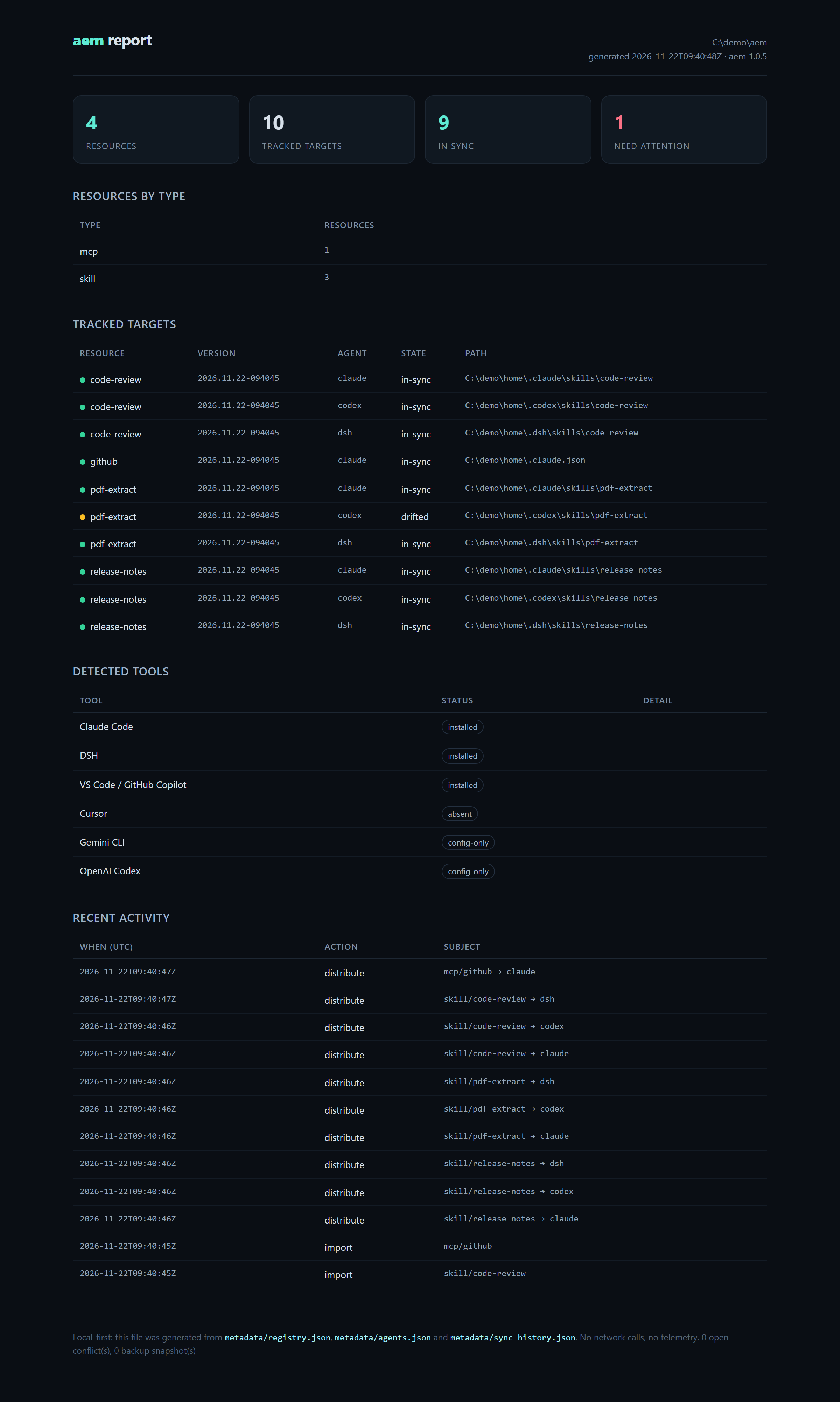
aem report writes one offline HTML file: resources, every tracked target with its live state, detected tools, and recent activity. Add --json for scripts.

aem report page: resources by type, tracked targets, detected tools, recent activity

60-second workflow

Everything is dry-runnable, and every write is preceded by a backup.

# 1. see what is installed where
aem scan

# 2. pull a skill from one tool into the shared library
aem import --source ~/.claude/skills/my-skill

# 3. copy it to any other agent (or all compatible ones)
aem sync --direction distribute --agent codex --agent cursor --resource my-skill

# 4. prove the copies still match the library
aem verify --all

# 5. when both sides moved, look before you leap
aem compare --resource my-skill --agent codex
aem sync --direction distribute --agent codex --resource my-skill --on-conflict keep-target

Safe by default

No daemon, no network calls, no telemetry. It only touches the paths you point it at.

Secrets stay put

MCP configs are merged field-by-field; env values are redacted to ${ENV_VAR} in the library and never synced across tools.

Dangerous payloads flagged

Imports are statically scanned (curl | sh, eval, base64 blobs, credential paths) and high-risk items need explicit --allow-risk.

Reversible

Every distribute and restore snapshots the target first; aem backup list/restore brings any version back.